Use Promise.allSettled() when independent requests can succeed or fail separately, and you want to keep the results that worked. It gives you one outcome for each request, in the original input order. A successful dashboard panel can show its data even when another panel needs to display an error.
One detail matters if the requests use Fetch. An HTTP error such as 503 normally gives you a fulfilled Fetch promise containing a response. To have allSettled() report that request as rejected, your request helper has to check response.ok and throw. Keep validation and parsing inside that same promise if a panel needs valid data before it counts as ready.

Decide which requests can fail independently
Imagine a dashboard with a profile, recent activity, and alerts. If alerts are temporarily unavailable, the other panels can still be useful. Give each panel its own loading, ready, or unavailable state. An empty activity list is a valid result and deserves a message such as “No recent activity.” A failed activity request deserves “Could not load activity.” Using the same empty list for both makes it impossible for the interface to tell the user what happened.
Some requests have to work together. If you need an account ID before requesting account details, first await the operation that supplies it. Then launch the independent work that can run with that ID. If a view makes sense only with all required data, treat the group as unsuccessful if any required request fails. Reserve partial results for a view you can still present accurately.
| What the screen needs | An approach that fits |
|---|---|
| Show independent panels with separate failures | Use allSettled and keep an outcome per panel. |
| Continue only when all required reads work | Use Promise.all for the required group and handle rejection at the boundary. |
| Start a request after getting an ID from another response | Await the first request, then start its dependent requests. |
| Render each panel the moment it is ready | Attach per-panel handlers. Use allSettled only for an overall finished state if you still need that state. |
What the results look like
The array returned by allSettled preserves the order of the inputs. If the alert response finishes before the profile response, the profile slot is still first when you passed it first. Each result has a status. A fulfilled result has avalue, while a rejected result has a reason. Check the status before accessing the corresponding property. A fulfilled result can contain an empty array, false, or null, so testing whether its value is truthy can give you the wrong answer.
Keep a stable ID with each job. Build the requests from a panel list and use that same list when reading the result array. Then the label follows the correct request even when you change which panels appear. A completion-order list from browser logs is useful for diagnosing latency, but it is a poor key for placing the resulting data back into the page.
MDN documents the outcome objects and their order. The ECMAScript specification defines the same behavior. The method waits for all of the inputs to settle. An ordinary rejection by one request becomes an outcome in the returned array. This does not make every surrounding line succeed. Build the input list safely and handle failures from code outside the batch as usual.
Make the Fetch helper match your definition of success
This example expects each successful response to contain JSON. It checks the status and parses the body inside each request promise. If your endpoint uses a deliberate no-content status, or if the result needs a particular shape, extend that function to follow the endpoint’s contract. A successful HTTP status and a successful parse still do not prove the data belongs in a particular panel.
async function getJson(url, { signal } = {}) {
  const response = await fetch(url, { signal });
  if (!response.ok) throw new Error("HTTP " + response.status);
  return response.json();
}

async function loadPanels(panels, base, request = getJson) {
  const settled = await Promise.allSettled(
    panels.map(async (panel) => request(base + panel.path))
  );
  return panels.map((panel, index) => {
    const result = settled[index];
    if (result.status === "fulfilled") {
      return { id: panel.id, state: "ready", data: result.value };
    }
    return { id: panel.id, state: "unavailable" };
  });
}
Give the helper a set of fixed paths from your application and the base URL your configuration expects. For example, use panel IDs such as profile, alerts, and activity, each paired with its own path. Render a placeholder for each panel while the batch is pending. Then match the returned ID to that panel and render the corresponding data or unavailable state. If you want to capture diagnostic context, record a safe panel ID and an appropriate error category before returning the simplified result. Raw responses and full error payloads are poor user-facing messages.
The async function inside map keeps a synchronous throw from an individual request adapter inside that panel’s promise. Without that boundary, a helper that throws during input construction can stop the mapping before allSettled receives the array. The default helper is itself async, but retaining this boundary matters when the code accepts a different adapter.
What the local requests actually did
The local test for this guide used a loopback HTTP server with Node.js v22.23.5. The server returned three panel responses with deliberate timing differences. Alerts finished first with 503. Activity finished next with an empty array. Profile finished last with valid data. The results still mapped back to profile, alerts, and activity in that order.
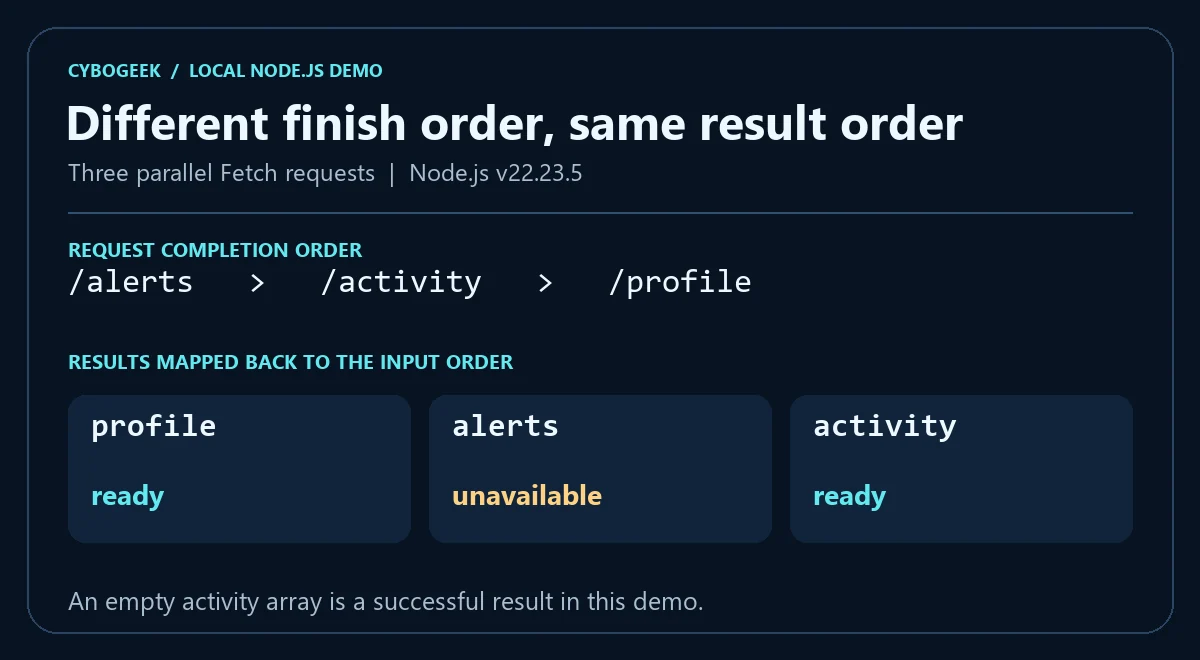
| Panel | HTTP result | Mapped state |
|---|---|---|
| Profile | 200 with a profile object | Ready, with the object |
| Alerts | 503, deliberately raised by the helper as a rejection | Unavailable |
| Activity | 200 with an empty array | Ready, with an empty array |
The local script also checked that an empty panel list returned an empty result and that a synchronous error in a custom request adapter became one panel failure. In a separate comparison withPromise.all, the failed alert request rejected the combined promise. That did not cancel the two other HTTP requests. Cancellation needs its own signal and policy.
This test measured behavior on a local server. It did not reproduce browser authentication, real network contention, or your hosting provider. In a deployed app, check the same outcomes against an actual test account and the loading states of the real page.
Handle slow requests and stale results separately
allSettled Only returns the batch when each input finishes or rejects. If one panel never settles, the batch stays pending, even if the other responses are ready. Set a timeout where it fits the request contract. Fetch accepts an abort signal, and supporting environments let you create one with AbortSignal.timeout(). If the user can leave the page or change filters while a request runs, decide how the old request should be cancelled or how an old result should be ignored.
A retry can use the failed panel’s ID and path instead of launching the whole batch again. Keep the other panels visible while you retry. Record the current filter or account choice when the request starts, then compare it before applying the result. Otherwise, an older batch can complete after a newer one and fill the page with data for the previous selection. If you set a timeout locally, test what the browser renders when the delay actually runs past it.
For a page that should appear progressively, use one handler per request to update its panel as soon as it settles. An overall allSettled can still mark the end of the batch, for example to clear a screen-level progress indicator. Give the app a concurrency limit if the job count can grow. A batch combinator observes the promises you give it and does not set the number of network calls that start at once.
Choose what to show when no panel is ready
Partial results are useful only when at least one part of the page has something meaningful to display. Suppose the profile endpoint and both optional panels fail. You can show a page-level message with a single retry control. If you record error categories before returning the simplified results, keep those categories for diagnostics. If only the alerts request fails, use the smaller message next to that panel. The distinction keeps the alert error from looking like a sign that the whole account has disappeared.
In an authenticated dashboard, the profile request may also tell you whether the person can open the rest of the view. If the documented response means the session has expired, show the signed-out state and clear data that belongs to the previous session. Treat that as a policy decision above the individual panel results. Optional read failures and a change in who may see the page need different handling.
Test a case where a panel has old data on screen. A temporary error with the same account and filter may allow you to keep showing the old result with a clear stale label. If the user has switched accounts or filters, those rows are no longer the right answer. This decision belongs where you apply the results. The settlement record itself cannot tell whether the data matches the current view.
Check the interface before you ship
Test a normal run and a run in which one optional endpoint fails. Confirm that its error does not clear data from successful panels. Test a valid empty response according to the endpoint contract and verify that it produces an empty state rather than a generic error. Then delay one request to see whether the screen waits by design or whether independent results should appear sooner.
Finally, change the selected account or filter while the first requests are pending. Confirm that the previous result cannot silently overwrite the new view. Check the diagnostic panel IDs against real request paths in DevTools. Successful partial rendering means that each panel remains honest about what it loaded and the user has a clear way to recover from the part that failed.